Wiring an LLM into your app can take an afternoon. Knowing whether it actually works is the hard part, and it's the part most of us skip.
I think evaluation is the most underestimated piece of LLM integration. Prompts, SDKs and model choices get the attention, then the feature ships because a few demo answers looked fine. Spending weeks integrating something without knowing whether it works is a strange way to build software, yet it's the default.
This post is for developers who know how to build and test software and are adding their first LLM features. It draws on two projects: my computer science thesis, an AI greenhouse assistant, and an AWS client project where we shipped an AI feature for end users. Along the way I lean on Chip Huyen's AI Engineering, the best treatment of evaluation I've read.
Why LLM evaluation is different from testing your code
Your test suite assumes something so basic you never think about it: same input, same output, one right answer. LLM features break all three. The same question can produce different answers on two runs, many answers can be correct, and "correct" is often a judgment call, not a string comparison.
That probabilistic output is a double-edged sword. It's what lets an LLM answer questions you never anticipated, and it's exactly what makes it hard to trust: the same feature that impressed you in the demo can give a confident, wrong answer on the next run.
Huyen splits evaluation into exact and subjective. Exact evaluation has no ambiguity: the JSON parses or it doesn't, the generated code passes its tests or it doesn't. Subjective evaluation depends on who, or what, is judging: is this answer helpful, faithful to the source, in the right tone?
Your testing instincts still carry over:
- Exact checks are your unit tests: fast, cheap, deterministic, run on everything.
- The eval set is your integration suite: real questions through the whole feature, scored against what a good answer must contain.
- User feedback is your production monitoring: the only signal from the wild.
What doesn't carry over is the expectation that everything goes green. More on that later.
Evaluate before you integrate
Huyen calls this evaluation-driven development, after test-driven development: define how you'll evaluate the application before you build it. She has asked conference audiences which is worse, an AI application that never shipped or one that shipped and nobody knows whether it works. Most picked the second, and I agree.
Before writing integration code, I'd write down three things:
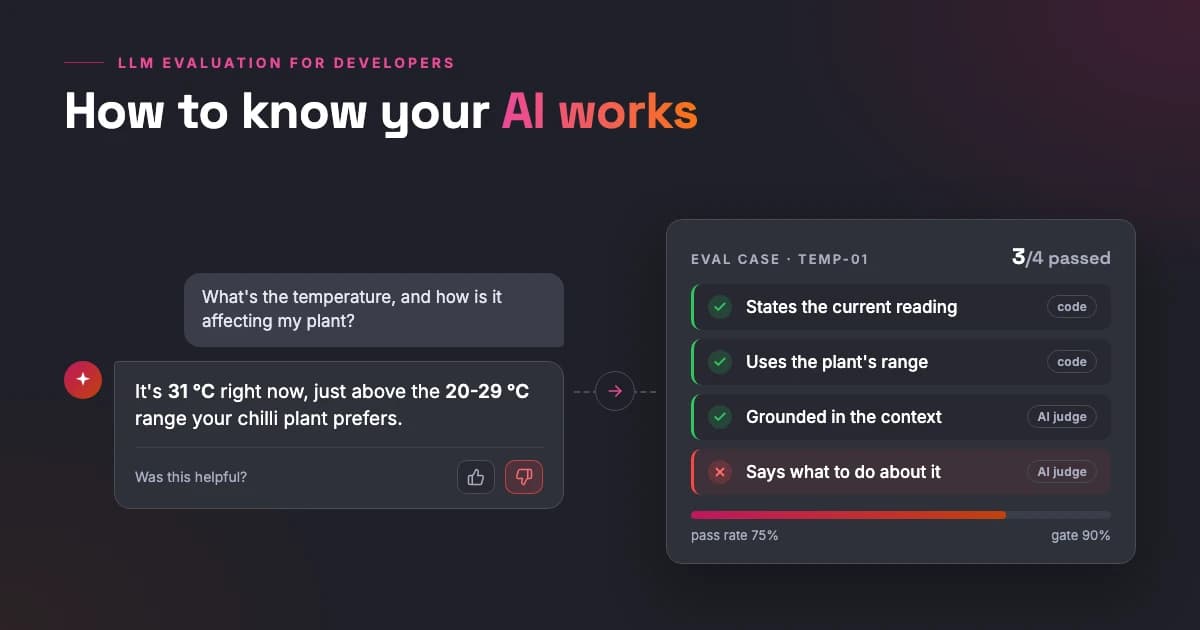
- What a good answer looks like, in terms you can check. Not "helpful", but "mentions the current reading and compares it to the recommended range".
- What the feature must not do. Which questions are out of scope, and how should it respond to them?
- What "correct but bad" looks like. The book's LinkedIn example: telling a job seeker they're a terrible fit might be correct and still useless. A good answer explains the gap and how to close it.
That's an hour and a document, not a framework, and it shapes every decision after it, including which model you pick: now you have something to measure candidates against.
Start with a small, honest eval set
For my thesis, Tiny Greenhouse, I built an assistant on top of a sensor-equipped mini greenhouse. It answers questions using live sensor data and a RAG knowledge base about the specific plant. Before calling it done, I evaluated twelve questions manually against expected answers.
The questions were designed so the model couldn't fake its way through: each one forced it to pull sensor data, RAG data, or both, and combine them correctly. A typical one: what's the current temperature, and how is it affecting my plant? A good answer states the actual reading, pulls the plant's recommended range from the knowledge base, and connects the two. The expected answer was a list of facts it had to contain, not a sentence to match.
Two lessons I'd pass on.
Evaluate the parts, not just the final answer. When an answer is wrong, you want to know where it broke. Did it read the wrong sensor value, did retrieval miss the chunk about the plant, or did it have both and still draw the wrong conclusion? Huyen makes the same point: evaluate each component separately, or you only know that something failed, not what.
Include questions it should refuse or can't answer. Out-of-scope questions and questions your data can't answer belong in the set. A model that confidently answers them anyway is failing, however good the answer sounds.
How many questions? The book reproduces an OpenAI rule of thumb for how many samples you need to trust that one version beats another: a 30% difference shows up with about 10 examples, 10% needs about 100, 3% about 1,000. A dozen questions will catch a badly broken feature, which is what you need early. They won't tell you whether this week's prompt tweak is 2% better. Grow the set as the feature matures.
Who should judge: code, humans, or another LLM?
Once you have questions and expected answers, something has to decide pass or fail. There are three candidates, and the right answer is usually a mix.
Code first
Anything a program can check, a program should check: exact match for short factual answers, "contains" checks for required facts, schema validation for structured output, and for generated code, actually running it. Huyen calls functional correctness the ultimate metric. The catch: most interesting LLM outputs can't be fully checked this way.
AI as a judge
For open-ended output, the common answer today is another model. An AI judge can score a response on its own, compare it to a reference answer, or pick the better of two. It's fast, much cheaper than people, and needs no reference answer. Know its problems first:
- A judge is a model plus a prompt. Change either and you have a different judge, so you can't read a move from 90% to 92% as progress unless the judge stayed exactly the same.
- Judges aren't consistent. The same judge can score the same answer differently twice. In one study the book cites, adding examples to the judge prompt raised GPT-4's consistency from 65% to 77.5%, and quadrupled the cost.
- Criteria aren't standardized. "Faithfulness" is a 1 to 5 score in MLflow, 0 or 1 in Ragas, and YES or NO in LlamaIndex. Same word, incomparable scores.
- Judges have biases. They favor their own outputs (the book reports roughly a 10% higher win rate for GPT-4 judging itself, 25% for Claude-v1), the first answer they see, and longer answers.
- Judges cost money. Judging every response roughly doubles your API calls, more with each extra criterion. I've written about what extra model calls really cost once you measure them.
The rules that follow: pin the judge model and prompt, set temperature to 0, ask for a classification (pass/fail or a 1 to 5 scale) instead of a precise number, include examples of good and bad answers, and never trust a judge whose model and prompt you can't see.
Humans
People are still the gold standard, and they're slow and expensive. Some teams keep them in the loop even in production: the book mentions LinkedIn manually evaluating up to 500 conversations a day with its AI systems.
For a developer starting out, the first human judge is you. Read the answers, write the rubric, then check that someone else would grade the same answers the same way. If a person can't apply your rubric consistently, a model won't either.
My rule of thumb: humans define and calibrate, code guards, AI scales.
Comparing models side by side
One more mode worth knowing is comparative evaluation: put two answers side by side and pick the better one. It's the idea behind leaderboards like Chatbot Arena (now just Arena), where people vote between two anonymous models, and the Artificial Analysis arenas, which do the same with blind votes for image, video and speech models. It works because choosing between two answers is much easier than scoring either one.
I run a tiny personal version of this. Whenever a promising new model appears on Ollama, I give it the same fixed task as the ones before it: build a snake game. Same prompt every time, so the comparison is fair, and after a few rounds you get a real feel for what "better" means for your work. It's not science, but it's a benchmark I control, which beats picking models by headlines. On the AWS client project we did it properly, using Bedrock Evaluations to compare a few candidate models before committing to one.
The book's main caveat: comparison tells you which model is better, not whether either is good enough. That's still your eval set's job.
LLM evaluation metrics: what each one is for
Every evaluation guide, the book included, walks through the same list of metrics. My take: a good AI engineer should know all of them, but they solve very different problems, and the right one depends on your use case.
| Metric | What it measures | When it's useful for app developers |
|---|---|---|
| Perplexity | How uncertain a model is when predicting the next token (lower is better) | Rarely: comparing base models, spotting text a model has already seen |
| BLEU / ROUGE | Word and word-sequence overlap with a reference text | Niche: translation or summarization with good reference texts |
| Semantic similarity | Closeness in meaning, via embeddings | When paraphrases are fine and you have reference answers |
| Exact match / functional correctness | Whether the output is right, or does what it should | Short factual answers, structured output, code. Use wherever possible |
| Precision / recall | How much of what you returned is relevant, and how much of what's relevant you returned | Retrieval, classification-like tasks, checking a judge against your labels |
| Faithfulness / groundedness | Whether the answer is supported by the provided context | RAG answers, usually scored by an AI judge |
Perplexity shows up in model reports constantly, but as an app developer you usually can't compute it: it needs token probabilities (logprobs), which many commercial APIs expose only partially or not at all. The book also calls it a weaker signal for post-trained models, which is every chat model you're likely to call.
BLEU and ROUGE reward answers that look like the reference, not answers that are right. The book cites a striking case: on a code generation benchmark, OpenAI found BLEU scores for correct and incorrect solutions were similar.
Precision and recall are the ones I think matter most, and the ones I'd learn first. They come from classic search and classification, and they map onto LLM features almost everywhere:
- Retrieval. Context precision: how much of what you retrieved is relevant? Context recall: how much of everything relevant did you retrieve? An illustration, not real project numbers: your retriever returns 5 chunks and 2 are about the right plant, so precision is 40%. If the knowledge base holds 4 relevant chunks, recall is 50%. Recall is harder to measure, because you have to label every relevant document, not just the retrieved ones.
- Classification-like tasks. Intent detection, routing, tagging, extraction: an LLM doing these is a classifier, so measure it like one.
- Your judge. Precision and recall against your own labels tell you how far to trust an AI judge's verdicts.
In a RAG feature like the greenhouse assistant, the answer can only be as good as the retrieval: if the right chunk never reaches the model, no prompt will save it.
What Microsoft Foundry and AWS Bedrock give you
You don't have to build all of this yourself, and I've seen the tooling on both clouds firsthand.
I first went through the Microsoft Foundry portal (then Azure AI Foundry) while preparing for my Azure AI-102 certification. What stuck with me is how it puts the model lifecycle in one place: model catalog and benchmarks, side-by-side comparison, fine-tuning and evaluation. Its built-in evaluators cover quality (groundedness, relevance, coherence and more), safety and agent behavior.
On AWS, Amazon Bedrock evaluations cover programmatic metrics, AI-judge evaluations, human evaluation with your own team or an AWS-managed one, and RAG evaluation for knowledge bases. You can bring your own responses, so the system under test doesn't have to run on Bedrock. This is what we used on the client project to choose between models for an AI feature for end users.
One warning applies to any built-in evaluator: its scores come from someone else's judge prompt and model, and its judge calls land on your bill. Pick the evaluators that match what your feature has to get right, not everything with a checkbox.
If you'd rather stay in code, promptfoo is a CLI with declarative YAML test cases that fits naturally into a JavaScript or TypeScript project and its CI (OpenAI announced it was acquiring promptfoo in March 2026 and committed to keeping the open-source tools going). DeepEval and Ragas are the Python favorites, and Langfuse covers tracing plus evaluation.
Run your evals like tests
To be upfront: I haven't put LLM evals into a CI pipeline yet. It's the obvious next step, and if I were starting today, this is how I'd do it.
Treat the eval set like a test suite and run it on every prompt change and every model change. A model swap is a code change, even when the diff is one string. The book cites a model upgrade that made one company's intent classification worse and another's support chatbot better. You only find out which group you're in by running your own evals.
Two differences from a normal test run. You gate on a pass rate, not on all-green, because outputs aren't deterministic and one flaky case shouldn't block a deploy. And you log everything (prompt version, model, judge configuration, results) so you can tell later what actually changed.
The smallest useful version is a script:
// evals/run.ts - run from the project root with: npx tsx evals/run.ts
import { readFileSync } from "node:fs";
import { askAssistant } from "../src/assistant"; // the feature under test

type EvalCase = {
  id: string;
  question: string;
  mustInclude: string[]; // facts the answer has to mention
  mustNotInclude?: string[]; // things it must never say
};

const PASS_RATE_THRESHOLD = 0.9; // a gate, not a promise of all-green

async function main() {
  const cases: EvalCase[] = readFileSync("evals/cases.jsonl", "utf8")
    .trim()
    .split("\n")
    .map((line) => JSON.parse(line));

  let passed = 0;
  for (const c of cases) {
    const answer = (await askAssistant(c.question)).toLowerCase();
    const ok =
      c.mustInclude.every((s) => answer.includes(s.toLowerCase())) &&
      !(c.mustNotInclude ?? []).some((s) => answer.includes(s.toLowerCase()));
    if (ok) passed++;
    else console.log(`FAIL ${c.id}: ${c.question}`);
  }

  const rate = passed / cases.length;
  console.log(`Pass rate: ${Math.round(rate * 100)}% (${passed}/${cases.length})`);
  process.exitCode = rate >= PASS_RATE_THRESHOLD ? 0 : 1; // non-zero fails the CI job
}

main().catch((error) => {
  console.error(error);
  process.exitCode = 1;
});
Each line of cases.jsonl is one question plus the facts a good answer must contain:
{"id": "returns-opened", "question": "Can I return an opened item?", "mustInclude": ["30 days"], "mustNotInclude": ["I'm not sure"]}
That case and the 0.9 threshold are placeholders: set your own based on how strict the feature has to be. String checks are crude and only work for checkable facts; for open-ended answers, swap the mustInclude check for a pinned AI judge that returns PASS or FAIL. When the script outgrows itself, move to promptfoo or similar instead of reinventing it.
The loop doesn't end at launch
The most important evaluation happens after you ship, and developers think about it least.
On the AWS project, the feature is now in the hands of end users, and we're waiting for their feedback on how it actually helps them. That feedback isn't a nice-to-have survey. It's the part of evaluation no eval set can replace, because real users ask questions you never thought of, in ways you never tested. The fixes that follow are part of the same process: every real failure becomes a new case in the eval set, so it can't quietly come back.
Huyen's chapter on user feedback is worth reading in full. The short version:
- Explicit feedback (thumbs, ratings) is easy to read but sparse, and it skews negative: unhappy users are the ones who bother.
- Implicit feedback is everywhere: stopping a response halfway, replying "No, I meant...", rephrasing, regenerating, editing the output. It's plentiful and noisy, a signal to investigate rather than a score.
- Ask at the right moment, ideally when something goes wrong, without interrupting the user's work. And it's user data: treat it like any other personal data.
Put together, evaluation stops being a phase and becomes a loop:
Where to start
If you take one thing from this post, make it this question: how do you evaluate the models in your app, and how do you know you're using the best one for your case? If the honest answer is "it looked good when I tried it", you're where most of us start, and the fix is small.
Pick a fixed task you understand, the way I keep reusing the snake game, and run every candidate model through it. Then, before you write integration code, write your first dozen real questions with the facts a good answer must contain. Everything else here builds on those two habits.
Retrieval deserves its own deep dive, and one is coming: retrieval strategies and how to optimize them, with precision and recall as the scoreboard.
If you're adding your first LLM feature and can't tell whether it works, reach out. I'm happy to compare notes.